Free Online Training VIDEOS,SAMPLES,TUTORIALS ON MCTS EXAM C#.NET(MS VISUAL STUDIO)
Thanks for your support. The blog is getting bigger and better day by day.
please check out :
www.blog.sameershaik.com
for further interesting articles on other microsoft certification examinations
Search this blog
You can search for all the topics in our blog using our google custom search now.
Search the blog
Loading
Showing posts with label Framework Fundamentals. Show all posts
Showing posts with label Framework Fundamentals. Show all posts
An enumeration is a user - defined integer type. When you declare an enumeration, you specify a set of acceptable values that instances of that enumeration can contain. Not only that, but you can give the values user - friendly names.
{
color skyblue = color.blue; int code = (int) Enum.Parse(typeof(color),skyblue.ToString());
if (code == 101010)
{
Console.WriteLine("The color you have chosen is "+skyblue+" and the color code is "+ code.ToString());
Console.ReadKey();
}
}
publicenumcolor
{
blue = 101010,
black = 000000,
white = 111111
}
Regards
Sameer Shaik
Tags: Microsoft MCTS exam, Learn, Tutorials, Free C#, Free Videos, Microsoft Dot Net Jobs,Microsoft Dot Net Jobs Interview, Free Training and Preparation, Jobs MCTS specialization, visual studio.net, study guide, sample questions, Exam Prep, Exam Practice Test
Value types are defined from System.ValueType while the reference types are derived from System.Object.
The stack holds the value type variables along with return addresses.
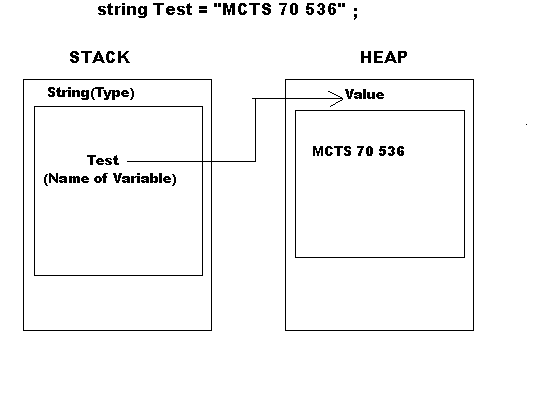
The heap holds the reference type variables value.
Copying Value Types Variables:
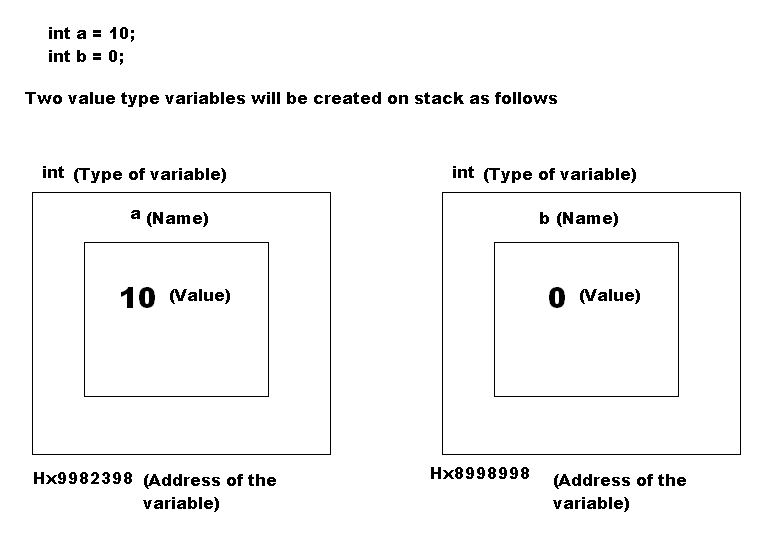
If you copy one value type variable from another, a direct copy of variable value is made.
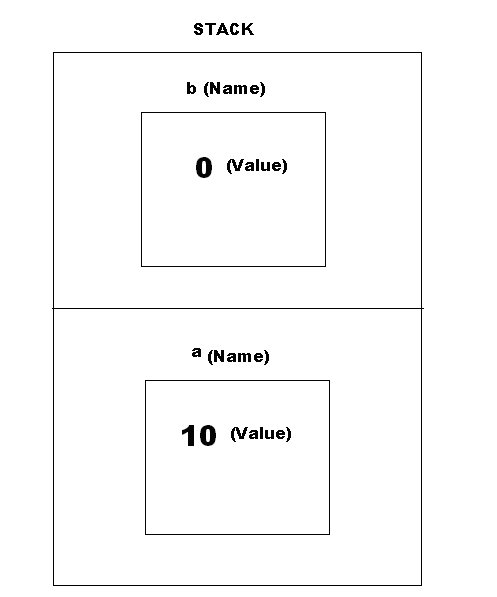
If you are curious how is it created on stack, then this is how it is looks on stack:
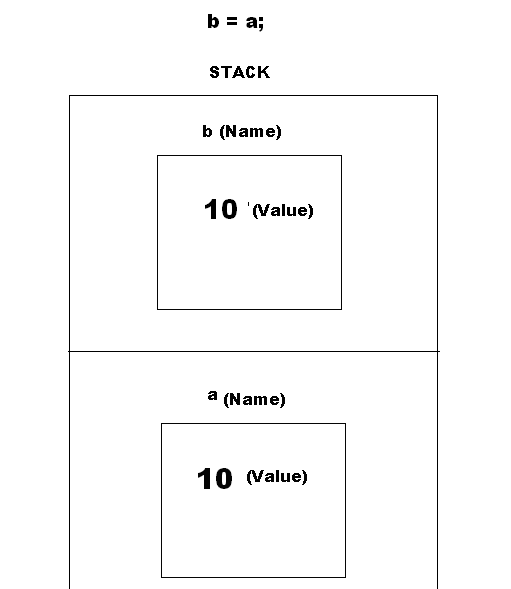
So now when we copy the value of a to b by using the following statement:
4. Value of a is directly copied to b.
Copying Reference Type Variables:
Lets create a variable of type reference. String is a built-in reference type, we will create an object of string and assign some value to it as follows:
Regards
Sameer Shaik
Tags: Microsoft MCTS exam, Learn, Tutorials, Free C#, Free Videos, Microsoft Dot Net Jobs,Microsoft Dot Net Jobs Interview, Free Training and Preparation, Jobs MCTS specialization, visual studio.net, study guide, sample questions, Exam Prep, Exam Practice Test
I have myself been confused with the actual usage of delegates in the beginning.I would be lying if i tell you this topic has been easy for me. However i can assure you that its not as big as it looks.
1. What is a delegate?
Answer: A delegate is a reference to a method / Pointer to a method.
2. How do you declare a delegate?
Answer : Before you ask this question, you should ask "which method is my delegate going to point to ?"
Imagine i have a method called displayname() in a class named Employee. The definition of this method is as follows:
public void displayname()
{
Console.WriteLine("Name of the employee is : "+ name);
}
Now i want to point my delegate to the above method displayname(). To be able to do that i must declare the delegate as follows:
public delegate void MethodPointer();
Observe that the above declared delegate doesn't have any parameters and return type just like displayname() method doesn't have return type and parameters.
I hope you understood now how to declare a delegate. You have to declare delegate according to function definition of method you want to point to.
3. How to link a method to your delegate?
Answer :
Just because you have declared a delegate, it doesn't mean you have linked your delegate to the method you want to call. To link your delegate you need to create an instance of the delegate and then you can assign the method call to the delegate as follows:
MethodPointer PointerToNameDisplay = new MethodPointer(displayname);
4. How to use a delegate?
Answer:
You can use delegate as an object, which is the amazing capability in the event programming world.
You can just go ahead and execute the method like this :
PointerToNameDisplay();
5. Why do i need to do all of this?(I guess i have workarounds to all of these???)
Answer:
Imagine you have a method which expects a delegate. Lets have its definition as follows:
public static void displayinformation(MethodPointer M1)
{
Console.WriteLine("Displaying information you have chosen");
M1();
Console.WriteLine("Press any key to clear the screen: ");
Console.ReadKey();
Console.Clear();
}
In the above method we are passing delegate "MethodPointer" we declared before in this post. All am doing in this method is, executing the delegate. One thing that you must have not realized that, i can send any object of "MethodPointer" as follows:
MethodPointer PointerToDesignationDisplay = new MethodPointer(displaydesignation);
MethodPointer PointerToDepartmentDisplay = new MethodPointer(displaydepartment);
MethodPointer PointerToSalaryDisplay = new MethodPointer(displaysalary);
Each of above objects are pointing to different methods. All of them must be pointing to methods whose declaration is like delegate declaration.
Now i can call the displayinformation method as follows:
displayinformation(PointerToNameDisplay);
displayinformation(PointerToDesignationDisplay);
displayinformation(PointerToDepartmentDisplay);
displayinformation(PointerToSalaryDisplay);
All of this can be acheived with delegates. If you are still not convinced about usage of delegates, its okay.You will only understand it when you use it in real time application OR IF YOU HAVE A GOOD IMAGINATION :p. Just prepare yourself to understand how it works. I strongly believe that should keep you ahead of others in terms of understanding the concepts.
Okay!!! now time for sample working application on delegates. Please start a console application and name it as PassValBetThreads. If you do not know how to start a console application, check this post: How to start a console application
Right click on your project on the right hand side and Add a new class, name it as "Employee".Double click on Employee and Please create the following methods in the class as follows:
using System;
using System.Collections.Generic;
using System.Linq;
using System.Text;
namespace PassValBetThreads
{
public class Employee
{
public string name;
public string designation;
public string department;
public string salary;
public void setEmployee(string _setname, string _setdesignation, string _setdepartment, string _setsalary)
{
name = _setname;
designation = _setdesignation;
department = _setdepartment;
salary = _setsalary;
}
public void displayname()
{
Console.WriteLine("Name of the employee is : "+ name);
}
public void displaydesignation()
{
Console.WriteLine("Designation of the employee is : " + designation);
}
public void displaydepartment()
{
Console.WriteLine("Department of the employee is : " + department);
}
public void displaysalary()
{
Console.WriteLine("Salary of the employee is : " + salary + " Dollars");
}
}
}
If you are done with that. Lets go to program.cs file, double-click on it. Declare a delegate and define a static method called displayinformation which accepts an object of delegate as a parameter. My code looks like this:
using System;
using System.Collections.Generic;
using System.Linq;
using System.Text;
using System.Threading;
namespace PassValBetThreads
{
class Program
{
public delegate void MethodPointer();
static void Main(string[] args)
{
int choice = 0;
Employee Sam = new Employee();
Sam.setEmployee("Sameer Shaik", "Programmer", "IT Development", "5000");
while (choice != 5)
{
Console.WriteLine("Please enter 1 to view name of employee");
Console.WriteLine("Please enter 2 to view designation of employee");
Console.WriteLine("Please enter 3 to view department of employee");
Console.WriteLine("Please enter 4 to view salary of employee");
Console.WriteLine("Please enter 5 to exit");
choice = Convert.ToInt32(Console.ReadLine().ToString());
if (choice == 1)
{
MethodPointer PointerToNameDisplay = new MethodPointer(Sam.displayname);
displayinformation(PointerToNameDisplay);
}
if (choice == 2)
{
MethodPointer PointerToDesignationDisplay = new MethodPointer(Sam.displaydesignation);
displayinformation(PointerToDesignationDisplay);
}
if (choice == 3)
{
MethodPointer PointerToDepartmentDisplay = new MethodPointer(Sam.displaydepartment);
displayinformation(PointerToDepartmentDisplay);
}
if (choice == 4)
{
MethodPointer PointerToSalaryDisplay = new MethodPointer(Sam.displaysalary);
displayinformation(PointerToSalaryDisplay);
}
}
}
public static void displayinformation(MethodPointer M1)
{
Console.WriteLine("Displaying information you have chosen");
M1();
Console.WriteLine("Press any key to clear the screen: ");
Console.ReadKey();
Console.Clear();
}
}
}
Run the program, and that should clear your concepts on delegates. If you are still confused, don't panic. You are not alone.Try to debug the application and see how the call flows from one method to another method.
If you do not know how to debug, check this video on my post: How to debug an application?
Regards
Sameer Shaik
FREE MCTS TRAINING RESOURCES, VIDEOS,SAMPLE,TUTORIALS,EVERYTHING
Check out my video tutorial on this post...